.png?width=271&height=81&name=Knowledge%20base%20small%20(4).png)
- User language - changes the display of the recruitment app to the selected language, and any new job created by the user will automatically select the same language.
- Job language - determines the language used for email communications with candidates and hiring managers.
- Company language - changes the default language for new users.
Supported languages
- English
- Polish
- French
- German
Planned languages
- Danish
- French
- English (UK)
- English (US)
- German
- Greek
- Italian
- Polish
- Portuguese
- Romanian
- Spanish
- Turkish
Translation coverage
- Around 97% of the Recruitment app is currently translated.
- Work is ongoing to complete the remaining areas.
- Support for customising diversity surveys (to allow for multi-lingual versions) is planned as part of the 2026 roadmap.
- We do not currently plan to offer multi-lingual versions of the features listed below. We would advise to create language specific versions:
- User email templates.
- Smart questions.
- Forms and documents.
- Interview scorecards.
- Application pages, hiring manager review screens and job listing pages are translated based on the website visitor's browser language setting. If they are viewing with their browser set to an unsupported language, the page will be displayed in the selected Job language.
User level language setting
- Settings>User settings.
- Allows each user to select their preferred language.
- The entire application will display in the selected language.
- New jobs will default to the user’s selected language.
- System-generated emails, such as password resets, are sent in this language.

Job language setting
- Set individually for each job.
- Determines the language used in system generated candidate and hiring manager email communications.
- Inherited automatically from User language settings for new jobs.
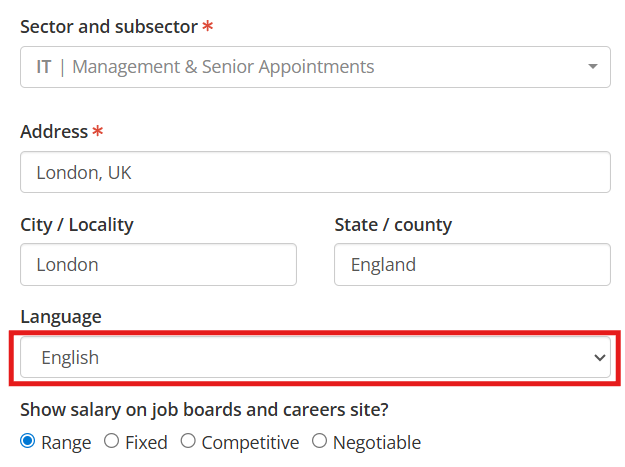
Company level language setting
- Settings>Company settings.
- Defines the default language for new users.
- Applies when Cezanne Recruitment is used as a standalone ATS (without Cezanne HR).
- When using Cezanne Recruitment alongside Cezanne HR, and new users are created via SSO, the user’s language is inherited from their Cezanne HR profile.
- If the selected language in Cezanne HR is not supported in the Recruitment app, the system will fall back to the default language setting configured for Recruitment.
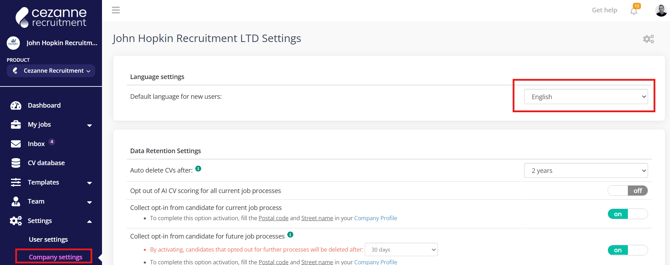
Recommended setup for using Cezanne recruitment in any single language
- Ensure Company settings - Default language for new users is correct.
- Ensure User Language is set correctly.
- New Jobs will inherit the language from the User that created them, meaning you will be unlikely to need to change that.
- Update the following features to create language specific versions to use in your hiring workflow:
- Email templates (see below guide for automatic application received email templates).
- Smart question templates and questions
- Interview scorecards
- Forms and Documents
- Job requisitions
- Rejection reasons (see below guide)
- Hiring flow stages (see below guide)
With these features updated, you can engage in a full hiring workflow, including requisition approval workflows, with all features and communications translated for the Cezanne recruitment user, hiring manager and candidates.
Recommended setup for multi-language use.
You may prefer to create a brand for each of your offices. e.g. 1 brand for UK, 1 brand for Germany etc, as using separate brands allows you to configure integrations (e.g. Job board integrations) for each brand.
The following guide will detail the recommended steps for configuring Cezanne recruitment to work with users working in multiple languages from a single recruitment account.
Firstly we would advise to create language specific versions of Candidate rejection reasons, Hiring flow stage labels and Application received emails. By customising these, users will see the language version of these versions based on their user language.
Candidate rejection reasons:
1. As as admin user, click to Templates>Rejection reasons.
2. Click edit next to each of your reasons:
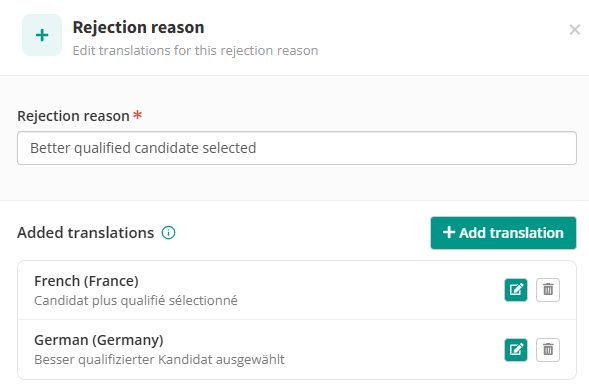
3. Click Add translation and select the language and enter the translated text for the selected rejection reason. e.g. Spanish:
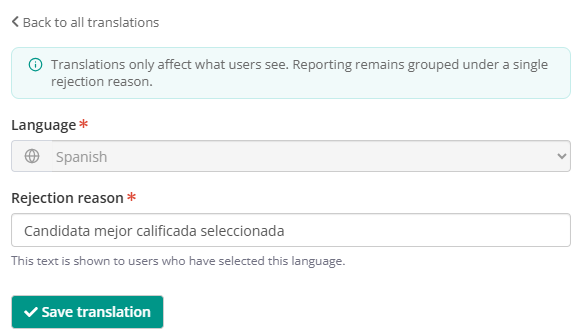
4. Click Save translation. Now, when a User views this rejection reason it will be presented using this translation.
5. Continue to add translations for as many languages as you require.
Follow a similar workflow to translate Hiring flow labels (Settings>Hiring Flow) and the Candidate application received emails (Templates>Email templates>Internal/External applicants New CV Auto response.