
Before you start
For a more in-depth walkthrough of the reporting are, see M5: Reporting in the Cezanne Learning course on Cezanne Academy.
Accessing logs
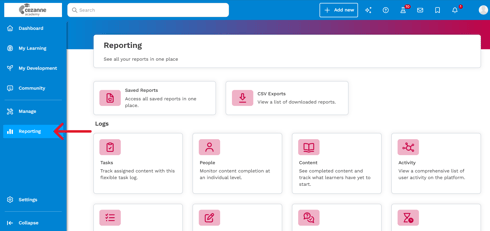
Cezanne Learning includes a range of Logs that you can use to report on learner progress, content completion and activity across the platform. These Logs provide the information you can use to review and create reports on different areas of learning.
To access all logs, click on “Reporting” in the left-hand taskbar.
📝 Note
The logs available to you will be displayed based on your level of access.
Available logs
Use the table below to help you choose the log that contains the information you want to review.
|
Log |
Use it to |
|
Tasks |
Track Tasks assigned to learners, including completion and deadlines. |
|
People |
Review learning and completion information for individual learners. |
|
Content |
Review completion information from the perspective of a particular piece of content. |
|
Activity |
Review actions taken by learners and other users across Cezanne Learning. |
|
Quizzes |
Review Quiz completion and the answers learners have provided. |
|
Exercises |
Review Exercise completion and the answers learners have provided. |
|
Surveys |
Review Survey completion and responses. |
|
CPD |
Review completion of CPD-marked Items and the CPD hours learners have completed. |
|
Audit |
Review changes made within Cezanne Learning, including administrative changes and changes users make to their personal information. |
|
Event Enrolment |
Review who is enrolled onto Events. |
💡Related Articles
For information on filtering, saving and scheduling reports, have a look at Saving, scheduling and filtering reports.