.png?width=271&height=81&name=Knowledge%20base%20small%20(4).png)
Before you start
-
Ensure that you are logged into Cezanne expenses as an Administrator
How to lock a user profile
- Click on Administration then User
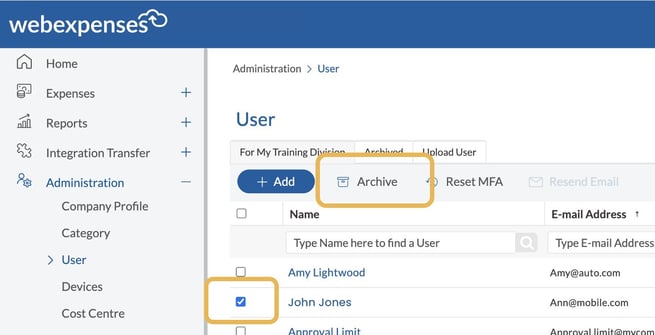
- Select the user you would like to archive
- Scroll down the screen until you see the Lock button
- Change it to Yes
- Click Save to keep your changes
The user is now locked and you will be returned to the user list.
.gif?width=670&height=377&name=download%20(1).gif)
How to archive a user profile
- Locate the locked user
- Select the user by ticking the box alongside their name
- Click Archive at the top of the screen
- Confirm by clicking OK on the pop up
The user has now been moved to the Archive tab.