
What is CPD?
Continuing Professional Development (CPD) can be tracked in Cezanne Learning using either points or hours. CPD can be allocated to:
- Items
- Events
- Quizzes
- Event Sessions
When learners complete content with a CPD value, the associated points or hours are added to their CPD record.
How to allocate CPD to an item
-
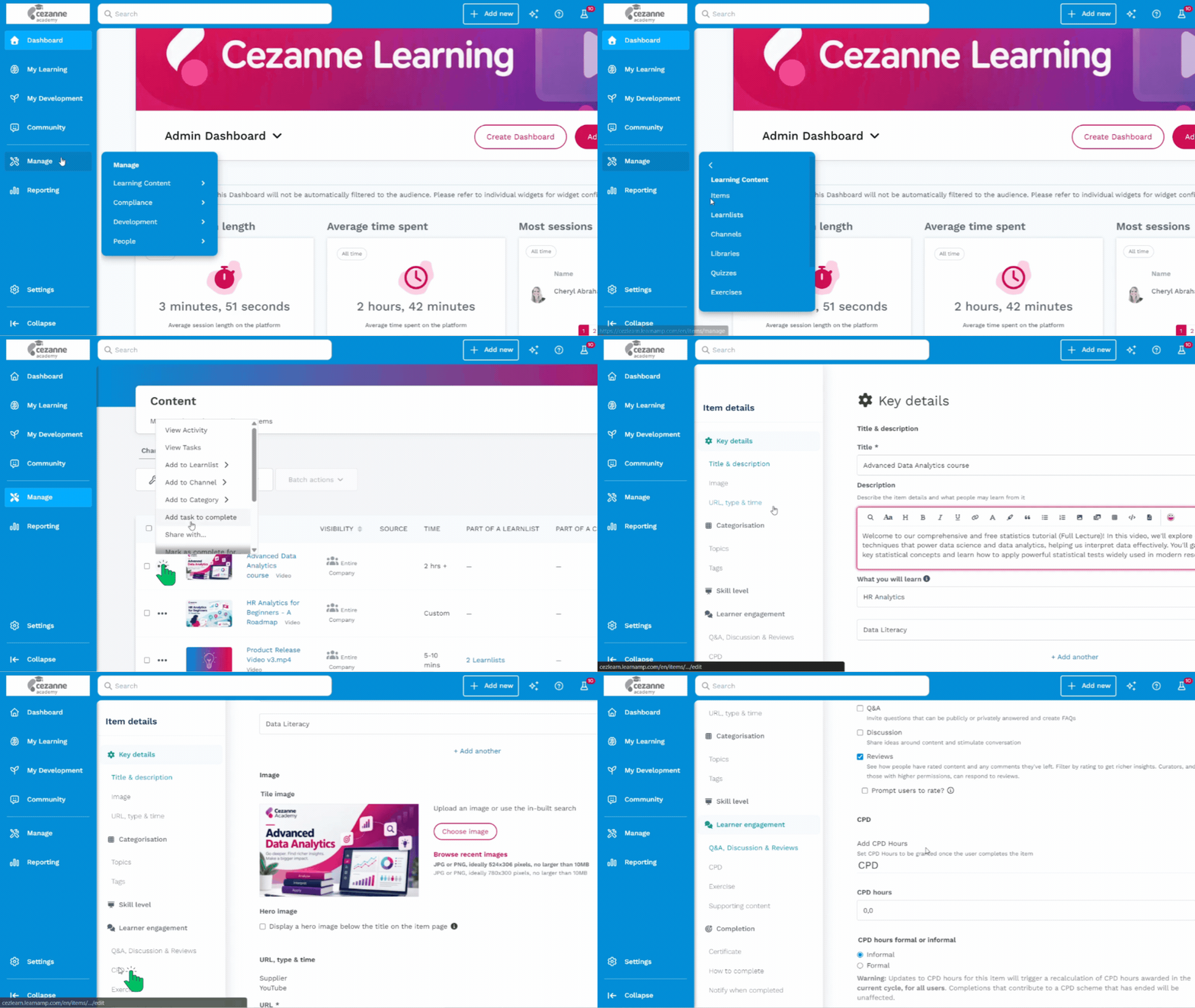
Go to Manage then Learning Content
-
Select Items and find the Item you want to allocate CPD to
-
Click on the three dots then clcik Edit
-
Select CPD from the Item Details menu
- Enter the number of CPD hours or points to allocate and choose whether the learning is Formal or Informal.
Formal vs Informal CPD
- Formal: Structured learning with defined objectives and an outcome, such as a facilitated workshop.
- Informal: Self-directed learning.
Where your CPD scheme has separate Formal and Informal targets, your selection determines which target the CPD contributes towards. The appropriate option depends on your organisation's own CPD policy.
How to switch between CPD hours and points
Go to Settings > Company Settings, then select the CPD tab to change the CPD tracking metric.
📝 Note
Changing between CPD points and hours does not convert existing CPD values. The setting changes the unit displayed across Cezanne Learning, while the stored numbers remain the same. For example, an existing value of 10 points would display as 10 hours after changing the unit to hours.