.png?width=271&height=81&name=Knowledge%20base%20small%20(4).png)
Cohorts within the Insights module allow you to make your own group of filters that can then be saved and reused. You can create multiple cohorts within your system that can be reused and revisited by any administrator within your system.
With cohorts you are able to:
- Apply a time context
- Apply role filters (e.g. Org Unit, Company or Deployment)
- Apply personal information filters (e.g. Gender, Age or Ethnicity)
How to create a cohort
- Go to either the Guidebook, Analyses report or a drilled down graph
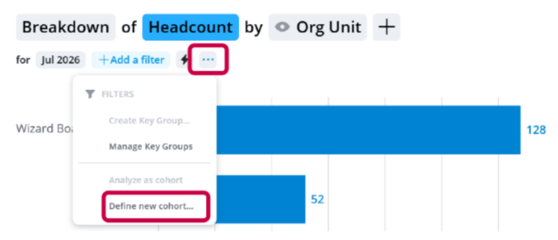
- Click the “…” next to filters
- Select Define new Cohort
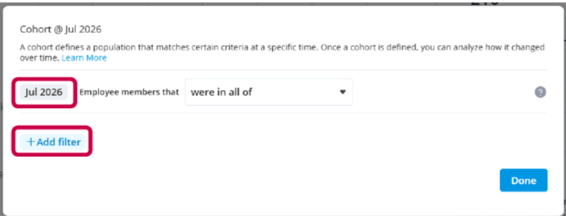
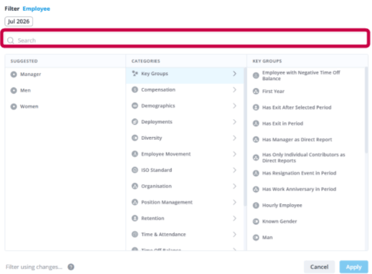
- Add filters for the group you're aiming to create
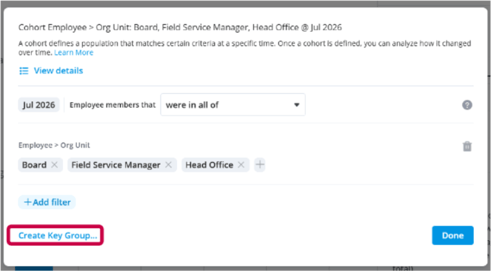
- Click Create Key Group to save the cohort
💡 Tip
When creating a Key Group, it is recommended to give it an appropriate name and description so that anyone looking at the group would understand why it has been created.
What is the difference between a Filter and a Cohort?
While a filter is a one-off way of filtering a chart or report that can then be captured. A cohort is a savable filter set that can be used across multiple reports/charts. Cohorts are then able to be shared across multiple users.