.png?width=271&height=81&name=Knowledge%20base%20small%20(4).png)
Cezanne's recruitment software offers different user types and permissions to manage access and ensure proper control over the platform. This support article will guide you on how to set user permissions for Administrator users and basic users in Cezanne Recruitment.
| Ability / Function | Normal User | Admin | Super Admin | |
| Grant/remove Admin role | No | Yes | Yes | |
| Grant/remove Super Admin role | No | No | Yes | |
| Reveal sensitive candidate custom-field answers | No | No | Yes | |
| Reveal sensitive Forms & Documents answers | No | No | Yes | |
| Access CV database search feature | Yes, only if the user has the CV database permission | Yes | Yes | |
| Access Favorite Recruiters feature | Yes, only if the user has the favorites permission | Yes | Yes | |
| Access Recruiters feature | Yes, only if the user has the recruiters permission | Yes | Yes | |
| Access Forms & Documents feature | Yes, only if the user has the forms & documents permission | Yes | Yes | |
| Access Contracts feature | Yes, only if the user has the contracts permission | Yes | Yes | |
| Access Job Requisition feature | Yes, only if the user has the job requisition permission | Yes | Yes | |
| Create new Job Requisitions | Yes, only if the user has the create job requisition permission | Yes | Yes | |
| View jobs | Yes, but access restricted only to assigned jobs | Yes | Yes | |
| Create and edit jobs | Yes, only if the user has the create & edit job permission | Yes | Yes | Yes |
| Post, report jobs, close, mark as filled | Yes, only if the user has the relevant job permission | Yes | Yes | |
| Act on candidates/CVs through hiring-company flows | Yes, but access restricted only to assigned jobs | Yes | Yes | |
| See all company jobs as admin | No | Yes | Yes | |
| Access Users/team management page | No | Yes | Yes | |
| Invite users | No | Yes | Yes | |
| Reinvite users | No | Yes | Yes | |
| Delete users in same business | No | Yes | Yes | |
| Update another user in same business | No | Yes | Yes | |
| Bulk update user feature permissions | No | Yes | Yes | |
| Automatically receives Admin permissions when promoted | No | Yes | Yes | |
| Access company settings | No | Yes | Yes | |
| Edit company/recruitment-agency profile | No | Yes | Yes | |
| Generate/access company invite tokens | No | Yes | Yes | |
| Access Careers Page settings | No | Yes | Yes | |
| Access Application Page settings | No | Yes | Yes | |
| Access Job Listing Pages settings | No | Yes | Yes | |
| Access Hiring Flow settings | No | Yes | Yes | |
| Access Integrations settings | No | Yes | Yes | |
| Access API Endpoints settings | No | Yes | Yes | |
| Access Custom Fields settings | No | Yes | Yes | |
| Access Billing page | No | Yes | Yes | |
| Access Smart Questions setup | No | Yes | Yes | |
| Access Diversity Questions setup | No | Yes | Yes | |
| Access Interview Scoring setup | No | Yes | Yes | |
| Access Forms & Documents template/settings page | No | Yes | Yes | |
| Access Job Requisition sign-off workflow setup | No | Yes | Yes | |
| Access Rejection Reasons setup | No | Yes | Yes | |
| Edit shared email templates | No | Yes | Yes | |
| Edit own custom email templates | Yes | Yes | Yes | |
| Access reports menu | No | Yes | Yes | |
| Access candidate reports | No | Yes | Yes | |
| Access diversity reports | No | Yes | Yes | |
| Access hiring-process reports | No | Yes | Yes | |
| Access jobs reports | No | Yes | Yes | |
| Access source reports | No | Yes | Yes | |
| Access team reports | No | Yes | Yes | |
| Manage hiring-company favorite recruiters | No | Yes | Yes | |
| Create favorite recruiter requests | No | Yes | Yes | |
| Reorder favorite recruiters | No | Yes | Yes | |
| View Favorites/Recruiters when explicitly permitted | Yes | Yes | Yes | |
| Use inbox/messages/notifications | Yes | Yes | Yes | |
| Edit own profile/settings | Yes | Yes | Yes |
Key differences:
1. Administrator Users: Administrator users have full system access and can perform the following tasks:
a. My Jobs:
- Administrator users can view roles posted by themselves or roles assigned to them.
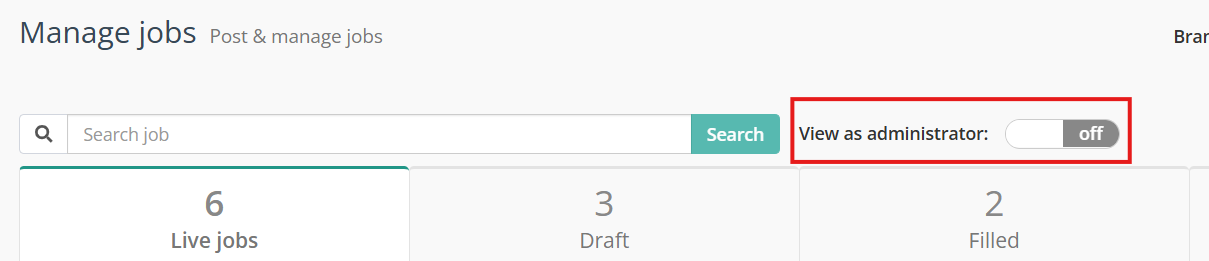
- In the "My Jobs" section, an additional option called "View as Administrator" can be enabled, allowing administrators to see all open jobs within the account.
b. CV/Resume Database Access:
- Administrator users have full access to the CV/Resume database across the entire account.
c. Templates Access:
- Administrator users can access various templates, including email templates, smart question templates, interview scorecards, forms and documents, job requisitions (if available), and rejection reasons.
d. Team Section:
- Administrator users can manage the team section, which includes adding or deleting team members, changing user permissions, and adding or removing favorite recruitment agencies.
e. Company Settings:
- Administrator users have access to company settings, including data retention settings, careers pages, job board integrations, default hiring flow, and API endpoints.
f. Reporting Suite Access:
- Administrator users can access the full reporting suite, allowing them to generate and analyze recruitment reports.
g. Billing Access:
- Administrator users have access to billing settings.
2. Basic Users: Basic users have limited access compared to Administrator users. Here are the restrictions and permissions for basic users:
a. My Jobs:
- Basic users can only see the roles they have posted or roles that have been assigned to them.
b. CV/Resume Database Access:
- By default, basic users do not have access to the CV database. However, this permission can be added by an administrator through the "Edit User" option.
c. Templates Access:
- Basic users have limited access to templates and can only create email templates. Additional permissions for accessing other templates can be granted by an administrator through the "Edit User" option.
d. Team Section:
- Basic users cannot edit or add team members.
e. Company Settings:
- Basic users do not have access to company settings.
f. Reporting Access:
- Basic users do not have access to the reporting suite.
g. Billing Access:
- Basic users do not have access to billing settings.