.png?width=271&height=81&name=Knowledge%20base%20small%20(4).png)
Cezanne Recruitment offers a number of default reports to enable you to report and monitor on key metrics, based on your team performance and hiring activities.
You can filter each report by parameters such as date range, user/owner, brand, sector etc. Once you're happy with the report you can export individual widgets or the entire report to CSV or PDF.
You can also schedule reports to run at your choice of date/time and have them arrive into your email inbox without having to manually run them.
To view available reports:
- From the left side menu select “Reports”
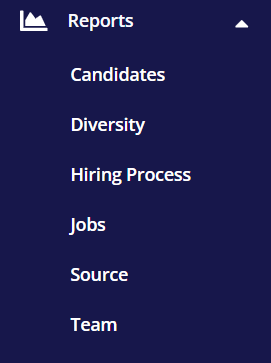
When the selected report opens, you can set filters such as the timeframe you want to report on, by clicking the filter shortcut in the top right of the screen:

If you want to save your filter selection, select "Set Filters as Default".
Please see linked content for more information about Exporting and scheduling reports.
Default Reports Overview:
Candidates:
- View overall Jobs summary
- Number of applications over time
- Average Interview score
- List of all hired candidates
Diversity:
- View diversity statistics based on your choice of question group, in areas such as gender, race or ethnicity.
- Note all information is anonymised and individual candidates cannot be identified in this report.
Hiring Process:
- View statistics on metrics such as total interviews by type, number of candidates that dropped off per stage, candidates by rejection reasons.
Jobs:
- Use this default report to report on Job activity, such as average time to hire, jobs by status, hires by source, time candidates spend in each stage.
- Use the Job list to filter the report by an individual job.
Source:
- Review how successful Candidate sourcing has been from job boards, agencies, careers page and referrals.
- View applicate numbers, total interviews from candidates by their source, rejection rates, hire rates by source, top referrers etc.
Team:
- View key team metrics such as total emails sent, new jobs posted, interviews and hires by team member, job requisitions approved vs rejected by approver.