
Roles within Cezanne Learning
Learn about the different Learning roles available in Cezanne Learning and the access each role provides.
What are learning roles?
Learning roles determine what users can see and do within Cezanne Learning, including their access to content creation, reporting, user management and administrative functionality.
Reminder:
If you are a Cezanne HR client, Learning roles are managed through the integration between Cezanne HR and Cezanne Learning. To change the Learning role assigned to a user, update the relevant security role mapping in Cezanne HR.
If your users are managed directly within Cezanne Learning rather than through an integration, an Administrator can update a user's Learning role from their user record.
Different Learning Roles
Learner
Learners can access content made visible to them and complete their own Tasks and assessments. They cannot create learning content or access information about other users through the standard Learner role.
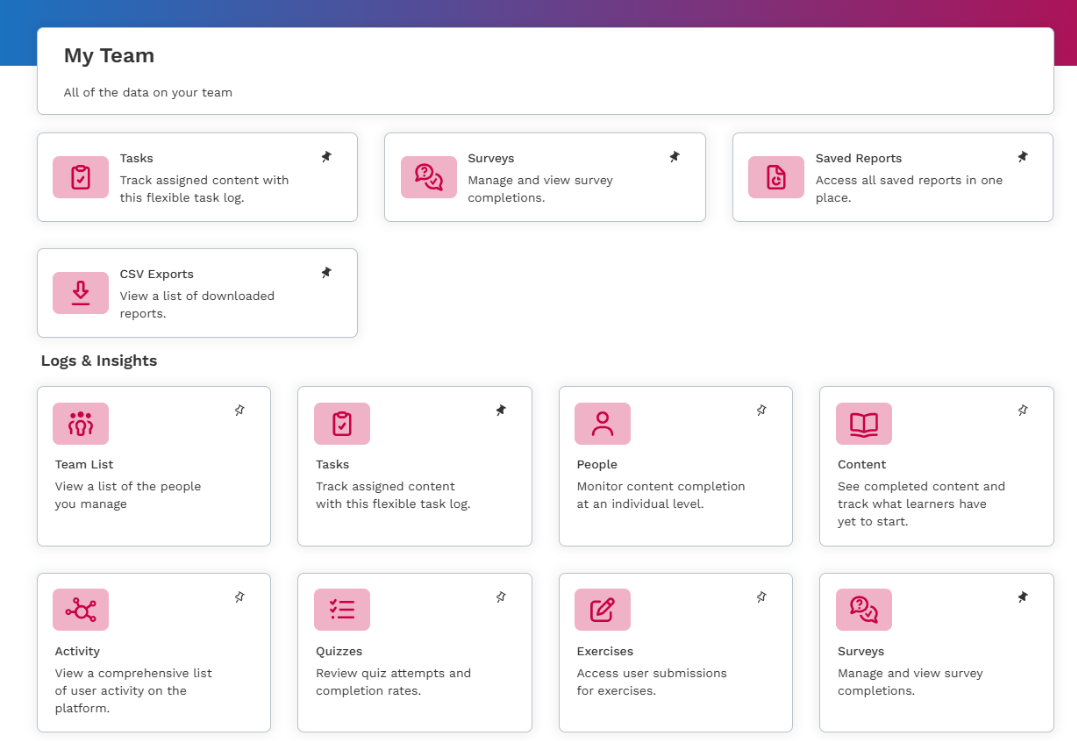
Line managers: Where a learner is also a Line Manager, they can access the Manager Dashboard and My Team area. This allows them to view information and run reports relating to their team's learning records.
Curator
Curators have standard learner access and can also create, edit and delete learning content, Events and assessments.
This role might be used by subject matter experts who need to contribute learning materials but do not need to run full reporting or have full person record access.
Reporter
Reporters have standard learner access with additional access to reporting and Tasks.
Learning Designer
Learning Designers combine content management and reporting capabilities, allowing them to manage learning content and assessments and access reporting.
Additional permissions can be granted individually to Learning Designers if you want to allow them to:
- Add, edit or delete Tasks
- Add, edit or delete Teams
- Log in as other users
- Create and manage quiz question banks
- Create and manage Groups
- Create, edit and manage reports in Advanced Analytics
Administrators
Administrators have access to most administrative functionality within Cezanne Learning, including managing learning content, Groups and Teams. Access to Log in as users can be controlled separately.
Owner
The Owner has the highest level of access within Cezanne Learning, including account ownership and deletion permissions that are not available to Administrators.