.png?width=271&height=81&name=Knowledge%20base%20small%20(4).png)
Per Diems are used by businesses as a method of reimbursing their employees, alongside traditional methods of claiming expenses or in some cases as an alternative to a traditional expense.They are popular in Europe, in particular Germany.
There are three different types of Per Diems within Cezanne Expenses:
We've also included a working example at the bottom of the page.Per Diem Version 1
Per Diem Version 1 is the simplest type of Per Diem and is the default option for all companies.
The Administrator can set up the rate description and default currency e.g. Lunch Allowance UK £5, Lunch Allowance non-UK 8 €.
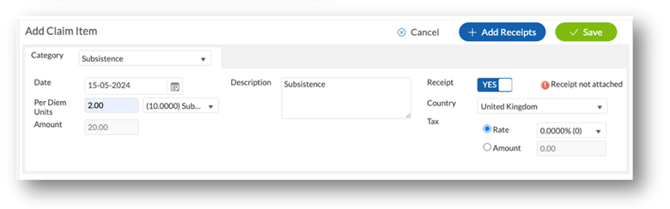
When a claimant selects the Per Diem category, they will be able to add the number of Per Diem Units and choose the applicable Per Diem rate.
The example shows UK Subsistence allowance £10 per instance where the default currency (GBP) is picked up.
Per Diem Version 2
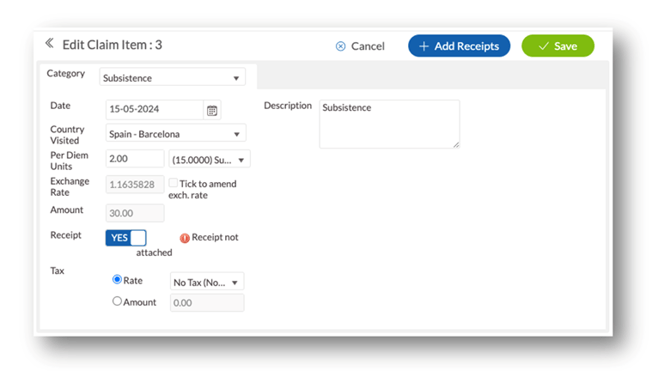
Per Diem Version 2 is also a simple category with the addition of being able to add a country. Whereas Per Diem Version 1 defaults to the base country of the company, Version 2 allows the company to set Per Diems for specific countries.
The administrator can now set up a specific rate, e.g. Subsistence based on the country the claimant was in at the time of claiming.
When the claimant selects the Per Diem category, they are now also asked for the Country visited and only the rates set up for that country will be available.
Per Diem Version 3
The final version of Per Diem that Cezanne Expenses caters for is Version 3. There are 2 types of Version 3 Per Diem:
24 hours:
Allows the Administrator to set up a number of durations (up to 10), one of which will always be above 24 hours e.g. 3 durations set up 00:00 – 12:00, 12:01 – 23:59 and above 24 hours.
Now when a claimant adds the Per Diem category they are presented with the following options
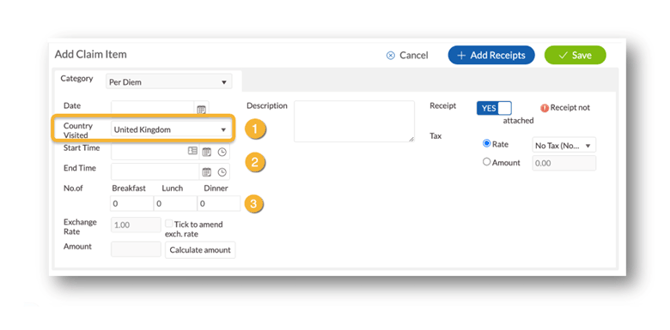
The claimant chooses the country visited  and adds the start
  and end time of the visit.
If any meals have been taken (and meal deductions is enabled) then the number of each type of meal are recorded in the appropriate box  .
.
These are deducted from the total amount. Clicking on Calculate Amount gives the claimant the Total to be claimed for that country and duration.
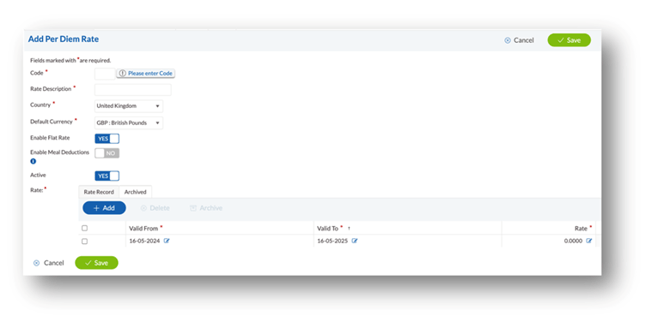
If Flat rate is enabled against the rate, the claimant will still record the start and end time of the visit but will be paid a flat rate regardless.
When using the Flat Rate, there should not be any other Per Diems active for that country.
Mid 12:
In addition to the above, this also allows the administrator to set an option to Enable Flat rates for Arrival and Departure.
When a claimant goes to add a Per Diem category, they are presented with the same screen as the 24-hour option:
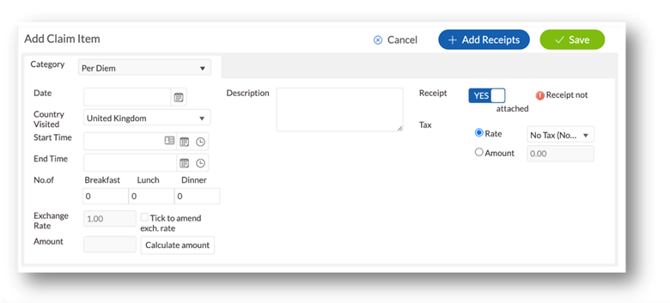
The claimant chooses a Country visited and adds the dates and time and any meals if applicable.
Working example:
The following rates have been set up as a working example to illustrate the calculations:
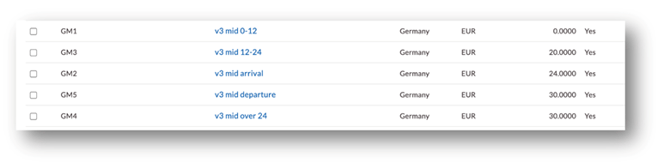
Note: These rates are for example only. Please check with your regional government for correct and current rates.
Scenario 1
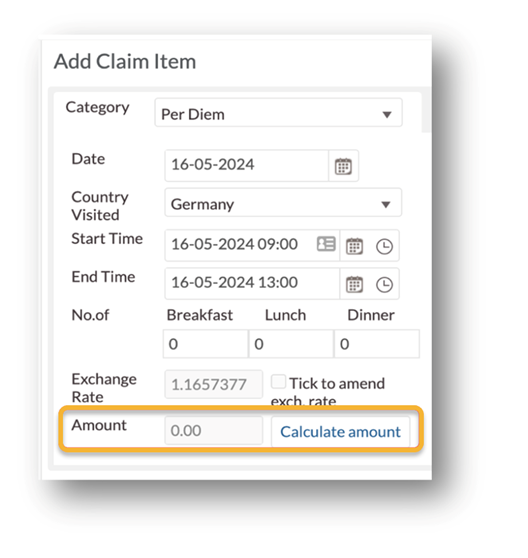
Travel begins on 16/05/2024 at 9:00 and ends on 16/05/2024 at 13:00. The amount is calculated at €0 as it uses rate GM1 from our table (0-12 hours).
Scenario 2
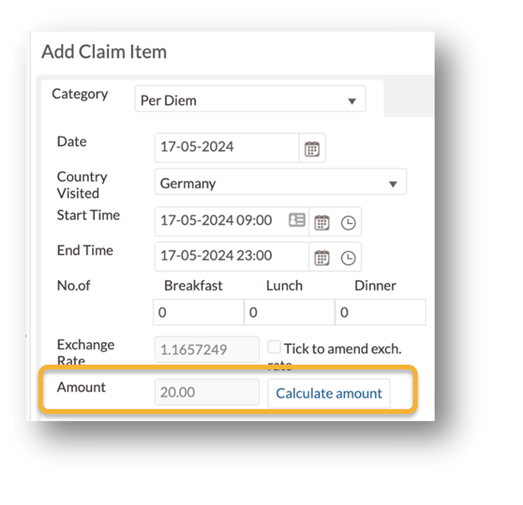
Travel begins on 17/05/2024 at 9:00 and ends on 17/05/2024 at 23:00. The amount is calculated at €20 as it uses rate GM3 from our table (12-24 hours).
Scenario 3
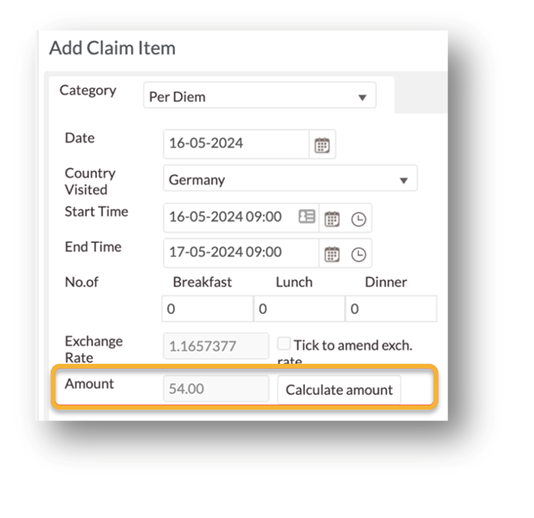
Travel begins on 16/05/2024 at 9:00 and ends on 18/05/2024 at 9:00. The amount is calculated at €54 as it uses rate GM2 and GM5 from our table (arrival and departure).
Scenario 4
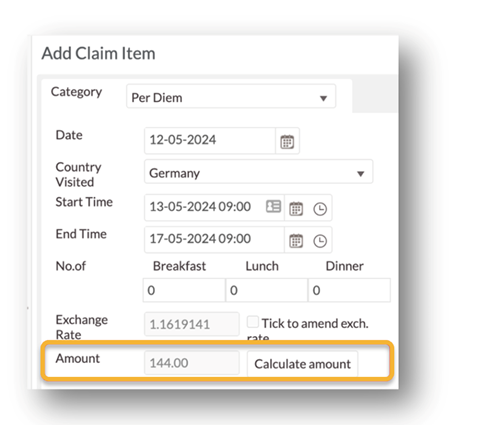
Travel begins on 12/05/2024 at 9:00 and ends on 17/05/2024 at 9:00. The amount is calculated at €144 as it uses rate GM2, GM5 and GM4 from our table (arrival, departure and 3 x over 24-hour rate).
Both types of Version 3 also cater for Meal Deductions; enabling meal deductions allows the administrator to set rates for Breakfast, Lunch and Dinner against each per diem duration, which are deductible from the total if taken.
Both versions also have a Flat rate override which when activated will negate the need to use a duration period and therefore pay a flat rate which does not depend on how long the claimant was visiting the country for.
💡 Tip
Have a look at How to set up per diem rates to learn more.