
Cezanne Recruitment publishes your external jobs to Indeed for free, and candidates can apply without leaving Indeed. Their application arrives in Cezanne Recruitment on the right job, like any other applicant.
The integration has three parts:
|
Part |
What it does |
Cost |
|---|---|---|
|
Indeed job listing |
Your live external jobs appear on Indeed. |
Free |
|
Indeed Apply |
Candidates apply on Indeed. Their CV, cover letter, contact details and answers to your screening questions come back to Cezanne Recruitment. |
Free |
|
Optional paid campaigns that boost a job's visibility, billed to your own Indeed account. |
Paid, set per job |
Indeed collects new and updated jobs from Cezanne Recruitment four times a day, about every 6 hours. A job you publish now can take up to 6 hours to appear on Indeed, and a job you close can take as long to disappear.
Is Indeed Apply enabled automatically?
Yes. Indeed Apply lets candidates apply on Indeed itself, without being sent to your Cezanne Recruitment application page. Cezanne Recruitment supports it and switches it on by automatically: every job sent to Indeed includes Indeed Apply, and job posting to Indeed is on by default for every new external job. You do not need to do anything to turn it on.
- New external jobs: the Indeed switch on the Job boards step is already on when you create the job. Leave it on and save.
- Indeed Apply is part of the Indeed listing. There is no separate Indeed Apply setting in Cezanne Recruitment. If a job is on Indeed, candidates can apply on Indeed.
- Internal-only jobs are never sent to Indeed. All job boards, Indeed included, switch off when a job is internal only.
- No Indeed account needed. The free listing and Indeed Apply work without one. You only need an Indeed employer account for Indeed Sponsored, or to have jobs linked to your own Indeed company account.
Checking Indeed Apply is on for a job
Because it is on by default, no action is needed.
How do I check if a job has been posted to indeed?
To check if job has been posted to Indeed, or to switch Indeed on for a job where it is off:
- Open the job and click Edit.
- Make sure the job is advertised externally (external, or both internal and external). Internal-only jobs cannot go to Indeed.
- Go to the Job boards step.
- Under Free boards, make sure the Indeed switch is On. Simply Hired switches on with it.
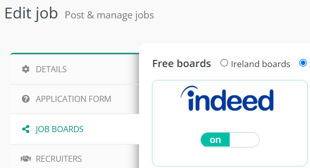
- Save the job and make sure it is live.
- Allow up to 6 hours for the job, with Indeed Apply, to appear on Indeed.
To get the most from Indeed Apply:
- Add screening questions to the job. Indeed shows them to the candidate on its apply form, and the answers come back with the application.
Opting out, and opting back in
Indeed is controlled job by job. Turning it off removes the job, and Indeed Apply with it, from Indeed. You cannot keep the Indeed listing and switch off only Indeed Apply.
To remove a job posting from Indeed:
- Open the job and click Edit.
- Go to the Job boards step.
- Switch Indeed to Off and save.
- The job leaves Indeed at Indeed's next update, within about 6 hours.
To opt a job back into posting on Indeed:
- Open the job and click Edit.
- Go to the Job boards step.
- Switch Indeed back to On and save.
- The job, with Indeed Apply, returns to Indeed within about 6 hours.
Things to know:
- Each new job starts with Indeed on. Opting one job out does not change the default for the next job, so switch it off on each job you want to keep off Indeed.
- Changing a job to internal only switches all job boards off. If you change it back to external, the free boards, Indeed included, switch back on.
- Indeed Sponsored is separate. A job can be on Indeed for free without a Sponsored campaign. It has its own switch on the same Job boards step, so check both when you change a job's Indeed settings.
Where do Indeed applications appear?
On the job, alongside every other applicant. The source shows as Indeed, Indeed Sponsored (from a Sponsored campaign) or Indeed Targeted (from an Indeed targeted ad), so you can see which route brought the candidate in.
What does Cezanne Recruitment receive from Indeed?
|
From the Indeed application |
Saved in Cezanne Recruitment as |
|---|---|
|
Email address (required) |
|
|
Full name (required) |
First name and last name |
|
CV file |
The candidate's CV |
|
Cover letter |
Cover note |
|
Phone number |
Phone |
|
Location |
City |
|
Screening question answers |
Smart question answers |
|
Diversity answers, if the job asks |
The job's diversity survey |
Why is my job not on Indeed yet?
Check that the job is live, external and has the Indeed switch on. Then allow up to 6 hours for Indeed's next update.
We already have an Indeed company account, how do we link our jobs to that account?
To link jobs to your own Indeed employer account, go to Settings > Integrations > Indeed. Your Indeed employer account must first be linked to your Site name(s) by Indeed support; only the account holder can ask Indeed to do this.
This page is a useful resource as it displays the total current published jobs under each brand.
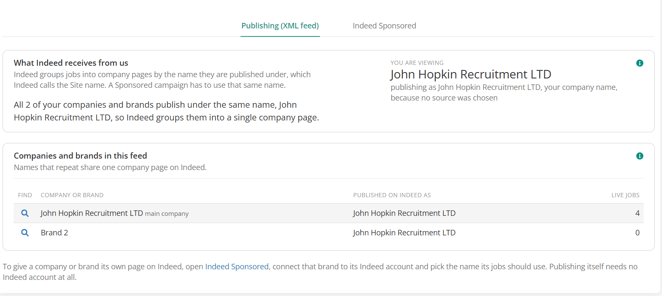
We have several brands. Which Indeed company page do the jobs appear under?
By default, under your main company name. To publish a brand under its own name, or to link jobs to your own Indeed employer account, go to Settings > Integrations > Indeed. Your Indeed employer account must first be linked to your Site names by Indeed support; only the account holder can ask Indeed to do this.
Do we need to pay for Indeed Apply?
No. The Indeed listing and Indeed Apply are free. Only Indeed Sponsored campaigns are paid, and they are billed to your Indeed account.