.png?width=271&height=81&name=Knowledge%20base%20small%20(4).png)
Enhancements:
Enhanced admin controls:
Following feedback from our customer special interest groups, we're excited to announce the release of 4 new User permissions, to allow admins to have tighter control over what users are able to do.
New User permissions:
- Create new requisitions
- Create new jobs / edit jobs
- Post jobs, close or mark as filled
- Download CVs
We've also restricted the ability to delete candidates to Super-admins only.
Deeper localisation:
-
Multi-lingual Candidate rejection reasons
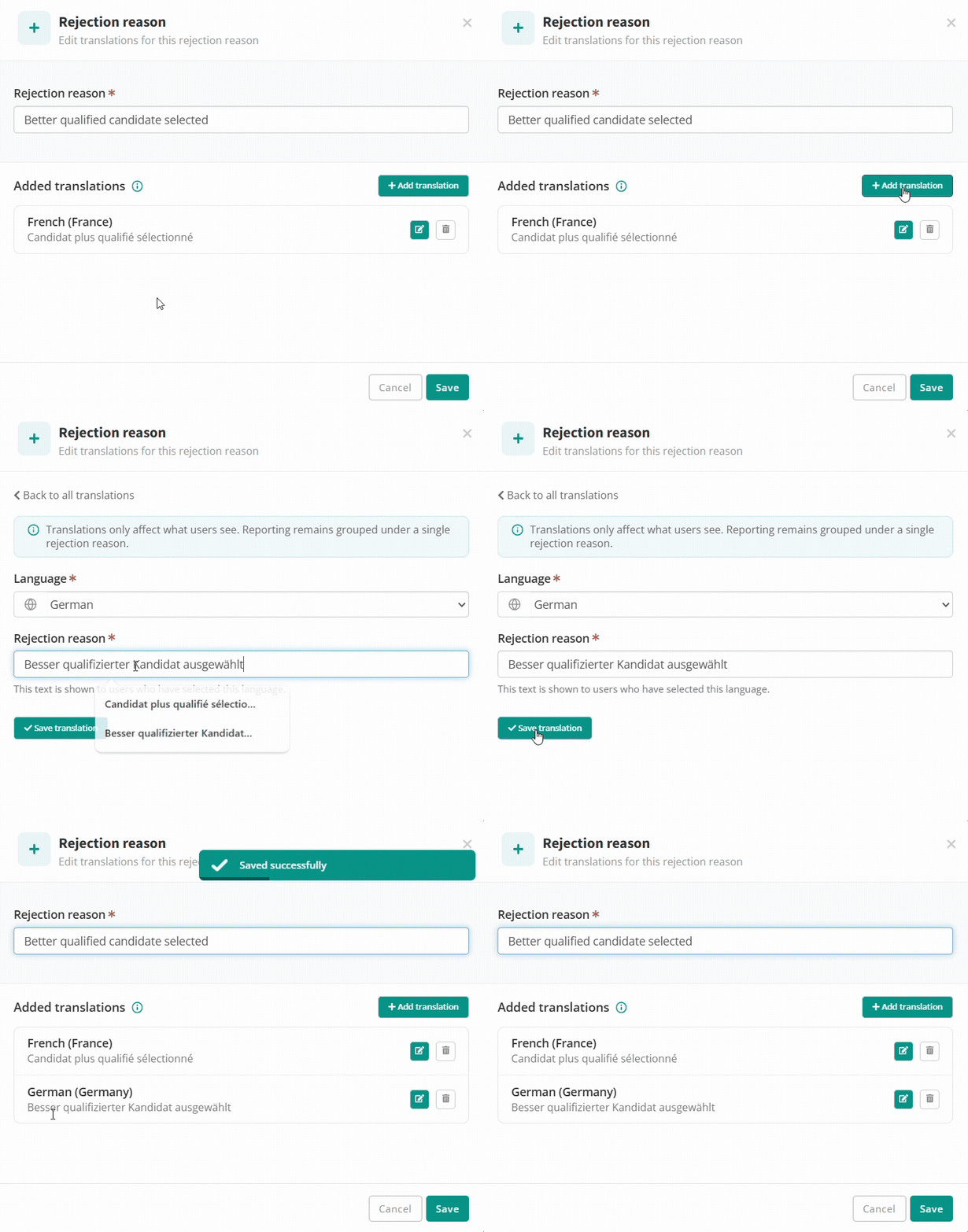
For customers that use Cezanne recruitment with Users working in multiple languages, you can now enter language specific labels for your candidate rejection reasons. Meaning users that use the application in a different language will see labels specific to that language. e.g. UK users can see "Better qualified candidate selected", German users can see "Besser qualifizierter Kandidat ausgewählt", provided a German translation has been added.
The gif below shows an example of how an admin can add additional translations through Templates>Rejection reasons
Click here for an admin guide on using the recruitment app with users operating in multiple languages.
Multi-lingual candidate auto response emails
You can now configure language specific email templates which are sent automatically when candidates apply for a job. Based on the job language, you can ensure candidates receive an email acknowledgement in a language identical to the job language.
To create language specific versions of this email, click to Templates>Email templates> Internal or External applicants new CV auto response>Click Edit and add a language specific email subject and body for as many languages as you need. This features uses a similar interface as demonstrated above for rejection reasons.
Multi-lingual hiring flow stages
You can now create language specific labels for your hiring flow stages. Meaning users will be language specific versions based on their user language setting. This approach keeps your reporting consistent as the same stages can be used with any supported language, avoiding duplication.
To create language specific versions of your hiring flow stage labels, click to Settings>Hiring flow and click the language icon next to each of your stages. You can then enter a language specific version for each of your hiring flow stages.
Other enhancements:
-
Date picker is now localised on the careers page, application page. Meaning candidates will view month labels translated into their browser language.
-
Hiring manager review links expire if not accessed within 2 weeks.
- Send to Cezanne window will now display the "Employment ID" field, if it's configured as a mandatory field in the Cezanne HR app. This removes the additional step for HR professionals to update the system generated ID inside Cezanne.
Fixes:
- Email platform enhancements to improve deliverability.
- Some CV database filters not working as expected
- "Workplace" value not stored when value sent via rest API
- Requisition forms were not always enforcing mandatory flags on questions.
- Various improvements to candidate source reporting.
- In some cases non-admins could only view their own email communication with a candidate, not all communication.
- Hiring manager review emails were only showing details of the first candidate only.
- CV library application flow now respects "Direct apply" setting.
- Numerous translation label updates following customer feedback.
- Some users were unable to send SMS interview reminders.
- Various indeed sponsored integration fixes.
- Unique data retention settings per country:
- e.g. Define candidate data retention policy of 1 year for Jobs in the UK, 3 years for Jobs in France, 2 years for Jobs in Germany etc.
- Multi-lingual hiring flow stage labels.
- France Travail job board integration.