.png?width=271&height=81&name=Knowledge%20base%20small%20(4).png)
💡Tip
Looking to explore the Onboarding module in more detail? Access our training course on Cezanne Academy. If you don't already have an academy account, contact your CSM or support.
The Onboarding module in Cezanne enables you to manage the onboarding process in one place by combining onboarding tasks, portals, and automated workflows. The main components of this module are Checklists and Onboarding Portals.
Using the module, you can:
- Manage onboarding activities centrally
- Track onboarding progress and deadlines
- Standardise onboarding processes across teams and locations
.png?width=670&height=304&name=Brown%20Beige%20Typographic%20Photography%20Business%20Card%20(2).png)
Checklists
Checklists help reduce manual administration by automating onboarding tasks and follow-ups for users involved in the onboarding process, while providing a central place to monitor progress. They also make it easier to track draft, active, and completed tasks, create reusable templates for different roles or locations, and standardise onboarding processes across the organisation.
These tasks can be assigned to:
- HR users
- Managers
- IT teams
- Payroll teams
- The new employee
-1.png?width=670&height=271&name=Brown%20Beige%20Typographic%20Photography%20Business%20Card%20(1)-1.png)
💡Tip
Checklists can also be used outside of onboarding for other business processes.
Onboarding Portals
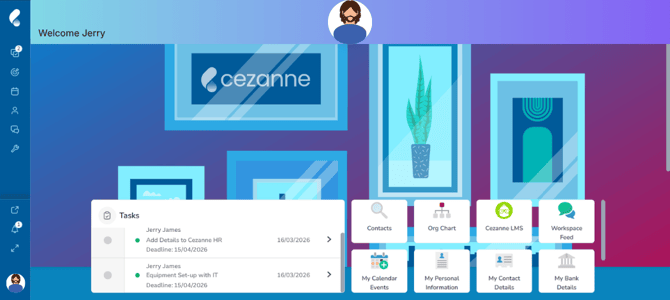
Onboarding Portals are the welcome screens employees see when accessing Cezanne for the first time. These portals can be customised to provide useful information and introduce new employees to your organisation.
Key Benefits of Onboarding Portals
- Lets you share important first-day information
- Introduces company culture using videos and images
- Displays team member information and biographies (optional)
- Supports onboarding for new starters and employees returning from long-term leave
- Tracks users with active onboarding portals
Typical Onboarding Setup Process
The following components are commonly configured as part of the onboarding process:
- Checklist Templates
- Portal Templates
- Onboarding Setup Process
- Checklists
- Assigning Portals to Users
.png?width=670&height=386&name=User%20Flow%20Diagram%20Whiteboard%20in%20Bright%20Blue%20Light%20Blue%20Light%20Green%20Bold%20Corporate%20Style%20(3).png)
💡Tip
Need more help with Onboarding? We’ve got answers in the following articles: